
WordPress, Wix and a custom-built website can all produce a professional site for a dental practice. The better choice depends on who will maintain it, how much control the practice needs, the available budget and how the website may grow.
A small clinic that wants to manage basic pages internally has different needs from a multi-location group with custom booking integrations. Start with those operational needs before comparing templates or visual styles.
Quick answer: Wix suits practices that value a managed, guided setup. WordPress offers more control and a broad choice of themes and integrations. A custom build makes sense when the clinic has requirements that standard platforms cannot meet economically.
What a dental website platform must handle
The platform is only useful when it supports the patient journey. A prospective patient should be able to understand the clinic, review treatments and clinicians, find practical information and take the next step without confusion.
- Treatment and service pages
- Dentist and team profiles
- Location, opening hours and accessibility information
- Clear contact and appointment actions
- Mobile-friendly forms
- Search-friendly page structure
- Secure updates, backups and access control
- Privacy and cookie requirements relevant to the clinic
Before choosing a platform, map the actual content you need with this dental clinic website pages checklist.
WordPress for dental websites
WordPress gives the practice control over hosting, design, content and many integrations. It works well for clinics that want room to add treatment pages, clinician profiles, articles or new locations over time.
Where WordPress is strong
- Large selection of themes and plugins
- Flexible content structure
- Control over hosting and site files
- Straightforward expansion for services and locations
- Access to many developers and agencies
- Strong options for technical SEO and structured content
What WordPress requires
The practice or its provider must manage hosting, software updates, backups, security and compatibility. A neglected WordPress installation can become slow or vulnerable. Clarify who owns these tasks before launch.
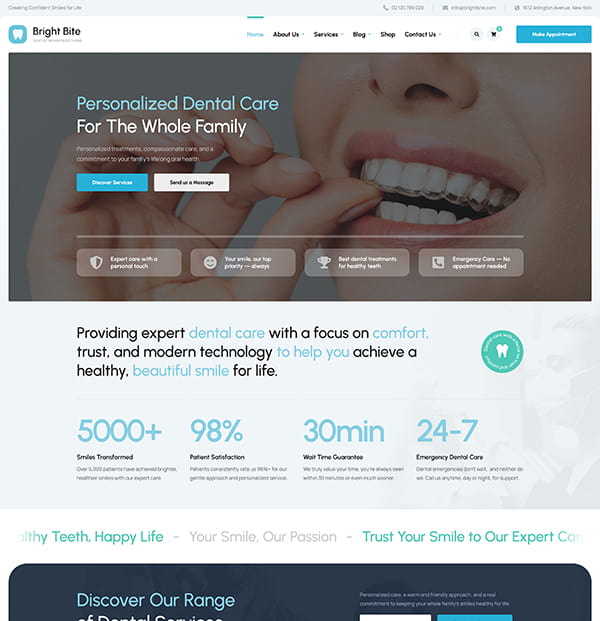
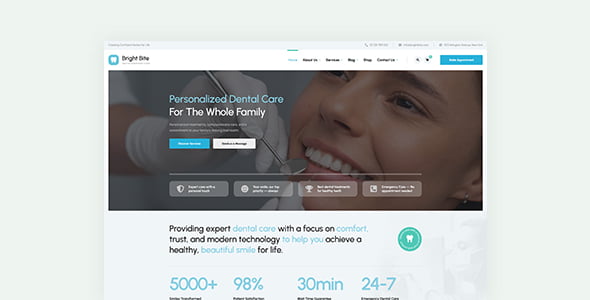
A specialized theme can shorten setup time. Bright Bite includes layouts for dental treatments, team profiles, testimonials, contact details and appointment calls to action.
Need a Website for Your Dental Clinic?
Bright Bite includes ready-made treatment pages, dentist profiles, pricing sections, and appointment forms—so you don’t have to start from scratch.
Wix for dental websites
Wix combines hosting, editing and platform maintenance in one service. It can suit a small practice that wants a guided visual editor and prefers to keep technical administration with one vendor.
Where Wix is strong
- Hosting and platform maintenance are bundled
- Visual editing is accessible to non-developers
- Templates provide a quick starting point
- Basic forms, analytics and marketing features are integrated
What to consider with Wix
The clinic works within Wix’s hosting, editor and extension system. Advanced content structures or unusual integrations may be harder to implement. Moving a mature website to another platform can also require rebuilding pages rather than exporting the site intact.
A custom-built dental website
A custom build is created around a specific brief instead of adapting an existing theme or builder. It may be appropriate for a large practice group, a distinctive patient portal or a complex integration that standard tools cannot support.
Where a custom build is strong
- Design and functionality can follow a precise specification
- Custom workflows can be developed around the clinic
- Performance can be optimized without unused template features
- The system can connect to internal services when suitable APIs exist
What a custom build requires
Custom work costs more to design, test and maintain. The clinic may depend on the original developer for changes, so contracts should cover ownership, documentation, hosting, security updates and what happens if the working relationship ends.
WordPress vs Wix vs custom: practical comparison
- Choose WordPress when you want flexibility, ownership and room to grow, and have someone responsible for maintenance.
- Choose Wix when you prefer an all-in-one service and your requirements fit its standard tools.
- Choose a custom build when a documented business requirement cannot be met well with an established platform.
Do not choose solely on the initial price. Compare setup, hosting, maintenance, licensing, future changes, content support and the cost of switching later.
Questions to ask before signing
- Who owns the domain, hosting account, design and written content?
- Who installs security updates and monitors backups?
- Can staff edit treatments, clinicians and opening hours?
- How will appointment requests be handled securely?
- Can the site connect to the clinic’s chosen booking system?
- What accessibility standard will the project follow?
- How will redirects and existing search traffic be protected during a rebuild?
- What ongoing fees should the clinic expect?
The platform will not fix unclear content
A polished template cannot compensate for missing treatment information, anonymous team pages or a difficult appointment process. Content, navigation, speed and mobile usability have a greater effect on the patient experience than the platform name shown in the site’s code.
Use the dental website design guide to plan that experience. Then choose the simplest platform that can support it reliably.
A Better Website for Your Dental Clinic
Present your treatments, dentist profiles, pricing, and appointment options with a WordPress theme built for dental clinics.