
A dental clinic website needs enough information to help a prospective patient understand the practice, evaluate relevant treatments and arrange an appointment. For most clinics, that means seven core pages: homepage, treatments, dentist profiles, about, fees, patient information and contact or booking.
Reviews, locations, emergency information and an advice library can support those pages when they reflect how the clinic actually operates.

Dental website checklist: Build the site around the questions a new patient asks: What does the clinic provide? Who will treat me? What will it cost? Where is it? What should I expect? How do I book?
1. Homepage
The homepage should identify the clinic, location and main services immediately. It should guide visitors toward treatments, clinician profiles and an appointment action without trying to place every detail on one page.
- Clear clinic type and location
- Main treatments or patient groups
- Appointment and telephone actions
- Short introduction to the team
- Opening hours
- Selected trust information
- Directions or a location link
- Useful information for new patients
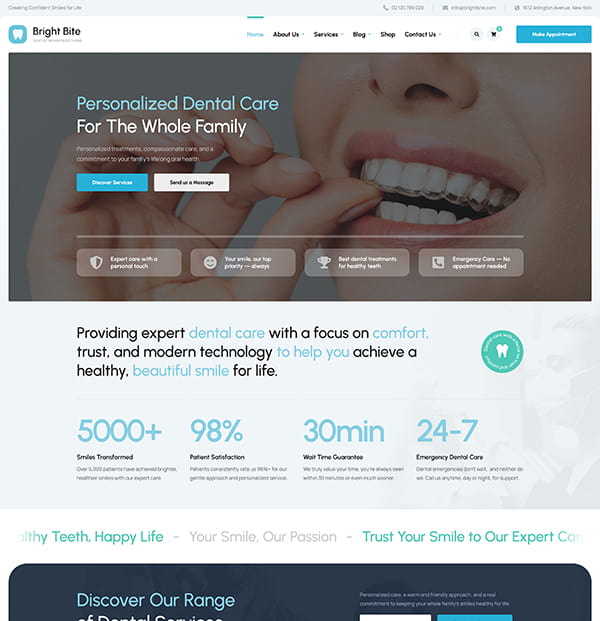
Need a Website for Your Dental Clinic?
Bright Bite includes ready-made treatment pages, dentist profiles, pricing sections, and appointment forms—so you don’t have to start from scratch.
2. Treatments overview and individual treatment pages
Use the overview to help visitors find the right category. Give major treatments their own pages when there is enough meaningful information to answer patient questions.
- What the treatment involves
- Why it may be considered
- How suitability is assessed
- Who provides it
- Likely stages and visit requirements
- Fees or how estimates are prepared
- Important limitations and questions to discuss
- A clear consultation or contact route
Treatment content should be reviewed by an appropriately qualified dental professional. Avoid diagnosing the reader, guaranteeing outcomes or presenting one option as suitable for everyone.
3. Dentists and team
Individual profiles help patients understand who works at the clinic. Include full names, roles, qualifications, professional registration details where applicable, areas of interest, languages and current photographs.
Support staff can also be introduced when it helps explain the patient experience. Keep the information current when team members or schedules change.
4. About the clinic
Use the About page for the practice story, clinical approach, facilities and details that distinguish the setting. Concrete facts are stronger than broad claims about excellence.
- When and why the clinic was established
- The types of patients and care it serves
- Approach to explaining treatment choices
- Facilities and technology
- Accessibility arrangements
- Infection-control approach
- Original photographs of the practice
5. Fees, insurance and payment
Patients should be able to understand likely costs before they commit to a visit. Publish a current fee guide when possible or explain when and how a written estimate is provided.
- Consultation and common treatment fees
- What an examination includes
- Insurance or reimbursement arrangements
- Available payment methods
- Finance plans and applicable terms
- Deposit and cancellation policies
- How treatment-plan changes affect the estimate
6. New-patient information
A dedicated page can answer the practical questions that arise before a first visit. This reduces calls to reception and gives anxious patients a clearer picture of what to expect.
- How to register or request an appointment
- What to bring
- Whether forms can be completed in advance
- What happens during the first appointment
- Referral or previous-record requirements
- Accessibility and communication support
- Policies for children or accompanying adults
- Privacy information
7. Contact and booking
Keep the next step clear and secure. Provide the full address, directions, opening hours, telephone number and an appropriate appointment or enquiry form.
Do not request a complete medical history through an ordinary contact form. Use a system suitable for sensitive personal information and explain how submitted data will be used.
Supporting pages to consider
Locations
Create a useful page for each real clinic location. Include staff, services, hours, transport, parking, accessibility and original photographs specific to that site.
Emergency dental care
If the clinic provides urgent appointments, explain when to call, the hours covered and what patients should do outside those hours. Do not imply that a web page replaces emergency assessment.
Reviews and patient stories
Use feedback only with suitable permission and in line with local healthcare advertising rules. Reviews can describe the experience, but individual outcomes should not be presented as typical or guaranteed.
Frequently asked questions
Answer recurring questions about appointments, fees, insurance, anxiety, accessibility, children, cancellations and after-hours contact. Link each answer to a detailed page when one exists.
Articles and patient information
An advice library can answer genuine patient questions and support relevant treatment pages. Identify the author and clinical reviewer, show publication and update dates, and review health information regularly.
How the pages support search and navigation
Give every page one clear purpose and descriptive title. Link treatment pages to relevant dentists, fees, patient information and booking. This helps visitors complete their task and gives search engines a more coherent picture of the site.
The guide on designing a dental website that helps new patients take action covers layout, mobile usability and trust in more detail. If you are still selecting a platform, compare WordPress, Wix and custom dental websites.
Pre-launch checklist
- Clinic details and opening hours are consistent
- Every treatment page has been clinically reviewed
- Clinician credentials are current
- Fees and policies are easy to find
- Forms work on mobile devices
- Personal information is handled securely
- Images have useful alternative text
- All appointment and telephone links work
- Old URLs redirect correctly after a redesign
- The clinic has a clear process for future updates
A Better Website for Your Dental Clinic
Present your treatments, dentist profiles, pricing, and appointment options with a WordPress theme built for dental clinics.