
Most landscaping businesses don’t need a complicated website with dozens of pages. A homepage, services page, About page, project gallery, reviews, service-area information and a contact page will usually give potential customers everything they need.
The important part is what those pages communicate. Can visitors immediately see what you do, where you work and what your finished projects look like? If they can’t, adding more pages won’t solve the problem.
I’ve been developing and supporting WordPress themes for small service businesses for more than a decade. Since launching The Landscaper WordPress theme in 2015, I’ve helped landscaping businesses and web designers set up websites, organize their services and present their projects online. This guide is based on the recurring questions they ask and the content I regularly see landscaping websites overlook.
This guide explains what each page should contain and how the pages work together as a practical sales tool for your landscaping business.
The 7 essential landscaping website pages
A complete landscaping website needs seven essential pages:
- Homepage
- Services
- About
- Project gallery
- Reviews and testimonials
- Contact or quote request
- Service area
A smaller landscaping company can initially combine some of these pages. However, dedicated pages give prospective customers more information and make it easier to understand your services, experience and locations.
| Page | Main purpose | Essential content |
|---|---|---|
| Homepage | Introduce the business | Services, location, projects, reviews and quote button |
| Services | Explain what you offer | Individual services, process and relevant projects |
| About | Establish trust | Your story, team, experience and qualifications |
| Project gallery | Demonstrate your work | Before-and-after photos and project descriptions |
| Reviews | Provide social proof | Specific testimonials and project details |
| Contact/quote | Generate enquiries | Short form, phone number and response time |
| Service area | Explain where you work | Locations served and relevant local projects |
1. Homepage: make it immediately clear what you do and where
Your homepage has one job: convince a local homeowner or property manager to take the next step.
Most people searching for a landscaper are comparing several companies at once. Your homepage needs to make it immediately clear what you do, where you work and how someone can contact you.
Unlike many industries, landscaping is highly visual. People want to see your work before they pick up the phone, so your homepage should provide a strong example immediately.
Include:
- A headline that says what you do and where
- A strong hero image or gallery of your best work
- Your phone number, clearly visible without scrolling
- A quote-request button or short contact form
- An overview of your main services
- Trust signals such as years in business or relevant qualifications
- A few short customer reviews
- The towns, cities or regions you serve
What makes a strong landscaping homepage headline?
Avoid vague headlines that could apply to any company:
❌ Welcome to Green Gardens — Your Local Landscaping Experts
Or:
❌ We offer landscaping services for homes and businesses.
Instead, describe the service and location:
✅ Professional Garden Design and Landscaping in New York
Or:
✅ Lawn Care and Garden Maintenance Across Greater Manchester
Your headline doesn’t need to be clever. It needs to help the right visitor recognize that they have reached a relevant business.
Use an original photograph of your best completed work near the top of the page. Real photographs provide evidence of what your company can deliver that a generic stock image cannot.
Need a Website for Your Landscaping Business?
The Landscaper includes ready-made service pages, project galleries, and estimate forms—so you don’t have to start from scratch.
2. Services page: tell people exactly what you do
“Landscaping” can describe many different services: garden design, lawn maintenance, tree surgery, paving, irrigation, seasonal planting and commercial groundskeeping.
A clear services page sets expectations and helps you attract the right type of customer.
Common landscaping services to list
Depending on your business, these might include:
- Garden design and landscaping
- Lawn care and maintenance
- Tree and hedge trimming
- Paving and hard landscaping
- Planting and seasonal maintenance
- Irrigation systems
- Commercial grounds maintenance
- Garden clearance and cleanup
If you specialize in a small number of services, make that clear. A focused website that explains four profitable services properly is more useful than a long, vague list of everything connected to landscaping.
Clear sections, descriptive headings and simple calls to action help visitors understand what you provide.
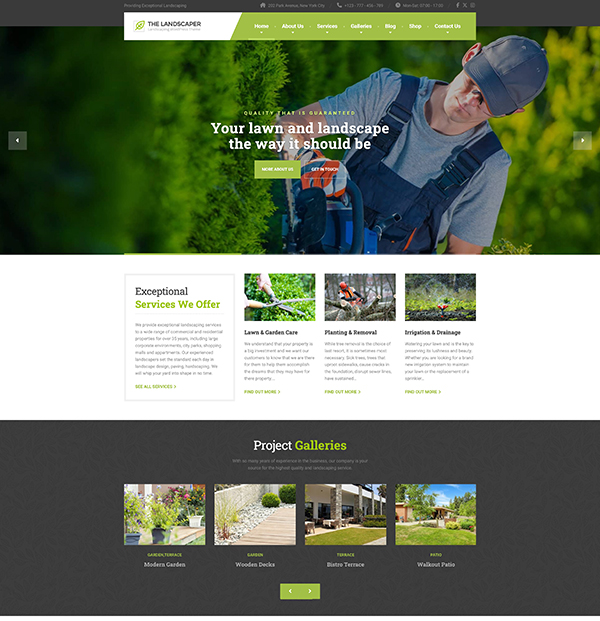
The Landscaper WordPress theme includes a ready-made services structure designed for landscaping and lawn-care businesses.
Disclosure: I developed and maintain The Landscaper. I’m referencing it because its demo provides a practical example of the page structures described in this guide.
Does every landscaping service need its own page?
No. Your most important services may deserve dedicated pages, while smaller related services can remain on a general services page.
Consider creating a dedicated page when a service:
- Generates an important share of your revenue
- Requires a detailed explanation
- Has several relevant completed projects
- Serves a distinct customer need
- Is something prospective customers actively search for
A separate garden-design page, for example, gives you room to explain the service, show relevant projects, answer common questions and include a dedicated quote request.
A separate page doesn’t guarantee higher search rankings. It does give you more space to answer the visitor’s question properly and demonstrate relevant experience.
3. About page: show the person behind the lawn mower
Landscaping is a trust-based service. Someone may be inviting you onto their property, sometimes when they aren’t home.
Your About page is where you stop being an anonymous company and show the people behind the work.
This is especially important for sole traders and small teams. Being a small, hands-on business can be a strength because customers know who will be responsible for their project.
What should a landscaping About page include?
Include:
- Your story and why you started the company
- Who performs the work
- Your service area
- How long you have been operating
- Relevant qualifications, accreditations or insurance
- The types of projects you specialize in
- Your approach to customer service
- Original photographs of you and your team
Avoid descriptions that could belong to any company:
❌ We are a professional landscaping company committed to delivering high-quality outdoor solutions.
Use specific details instead:
✅ I started the business in 2010 after working in garden construction for six years. Today, our four-person team specializes in residential garden redesigns across North London.
Specific information gives prospective customers a clearer reason to trust you.
Use real photographs of yourself and your team working—not posed stock images. Customers want to know who will arrive at their property.
4. Project gallery: let your work do the talking
Landscaping is visual and tangible. Prospective customers want to see whether you have completed work similar to the project they have in mind.
A useful gallery doesn’t just display attractive photographs. It explains what the customer wanted, what you did and what the finished result achieved.
The Landscaper WordPress theme includes a dedicated project structure for presenting photographs and relevant project information.
What makes a useful landscaping gallery?
For each substantial project, include:
- Before-and-after photographs
- The project location or general area
- The type of work completed
- The customer’s original request
- Your proposed solution
- Materials or plants used
- Approximate project duration
- A related testimonial, when available
- A link to the relevant service
For example:
Residential garden redesign in New York
The customer wanted a low-maintenance family garden with more privacy. We replaced the damaged lawn, installed porcelain paving, added raised planting beds and introduced evergreen screening along the rear boundary. The project took eight working days.
That description is more useful than an image caption that only says “Recent garden project.”
You don’t need hundreds of photographs. Start with a smaller selection that demonstrates:
- Different services
- Different property sizes
- Different levels of complexity
- Consistent quality
- Projects similar to the work you want to attract
If you’re not yet documenting every project, my guide on how to get more landscaping customers explains how to photograph completed work and use it across your website and marketing.
5. Reviews and testimonials: word of mouth online
Most landscaping businesses grow partly through recommendations. Your website should reproduce some of that trust for visitors who haven’t heard about you from an existing customer.
You can create a dedicated reviews page, but don’t hide every testimonial there. Place relevant reviews throughout the website:
- Homepage
- Service pages
- Project pages
- About page
- Contact or quote page
What makes a landscaping review convincing?
A useful review includes specific details:
- The service provided
- The customer’s original problem
- Communication and reliability
- The completed result
- The location
- Whether the customer would recommend you
Compare these examples:
❌ Great work. Highly recommended.
And:
✅ Barry and his team redesigned our back garden, installed a new patio and completed the planting in eight days. They arrived when promised, kept us updated and left the site clean every evening.
The second review gives prospective customers more evidence.
Match reviews to the surrounding content where possible. A lawn-maintenance testimonial is more useful on the lawn-care page than a review about a complete garden redesign.
After finishing a project, ask for a review while the customer’s experience is still fresh. For practical advice, read how to get more landscaping reviews.
6. Contact or quote page: remove every obstacle
Most landscaping projects require more information—or a site visit—before you can provide an accurate price.
The goal of the contact page is therefore not necessarily to complete a sale. It is to start a useful conversation.
Include:
- A short enquiry form
- Your phone number
- Your email address
- Your service area
- Business hours
- Expected response time
- An optional photograph upload
- Privacy information for submitted details
Make your phone number easy to tap on mobile devices.
What should a landscaping quote form ask?
Begin with the information you need to assess the enquiry:
- Name
- Email address or phone number
- Postcode or project location
- Type of service
- Short project description
- Optional photographs
- Preferred contact method
You can collect garden dimensions, material preferences and other details later unless they are essential for your initial assessment.
Set clear expectations next to the form:
We provide free, no-obligation quotes for landscaping projects in Amsterdam and the surrounding area. Send us a short description and photographs, and we’ll respond within one working day.
This tells customers what will happen after they submit the form.
7. Service area page: explain where you work
A service-area page tells visitors whether your company works in their location. It also gives search engines clear information about the geographic areas associated with your services.
Include:
- Your primary town, city or region
- Nearby locations you regularly serve
- Services available in those locations
- Travel restrictions or minimum project requirements
- Relevant completed projects
- Local customer reviews
- A quote-request button
If you serve several important locations, individual location pages can be useful—but only when you have meaningful information for each one.
A useful location page might contain:
- Projects completed in the area
- Services frequently requested there
- Original local photographs
- Customer reviews from that location
- Travel or scheduling information
- Property or garden types commonly encountered
Don’t copy the same page and swap the town name. If you can’t provide meaningful information for each location, create one comprehensive service-area page instead.
Adapt the website to your type of landscaping business
Not every landscaping business needs exactly the same supporting pages.
| Business type | Particularly useful content |
|---|---|
| Garden designer | Design process, consultations and design portfolio |
| Landscape contractor | Detailed projects, construction process and materials |
| Lawn-care company | Maintenance packages and recurring plans |
| Tree-care company | Qualifications, insurance and emergency services |
| Commercial landscaper | Sectors served, accreditations and contract capabilities |
| Garden-maintenance company | Service frequency, seasonal services and packages |
Your website structure should reflect how customers evaluate and purchase your services.
For example, commercial customers may need proof of insurance and contract capacity. Residential garden-design customers may care more about your portfolio, process and consultation options.
Optional pages worth adding
Once the seven essential pages are complete, consider adding the following where they help customers.
Frequently asked questions
Answer questions customers regularly ask:
- Do you offer free quotes?
- How far in advance should I book?
- Do you remove garden waste?
- Are you insured?
- Can you work from an existing design?
- Do you provide ongoing maintenance?
- What happens when bad weather delays a project?
A good FAQ saves time and helps potential customers understand what to expect.
Blog
A blog is optional. Publish when you have useful, first-hand information for your intended customers.
Relevant subjects could include:
- How to prepare for a garden redesign
- When to schedule landscaping work
- Choosing materials for patios and paths
- Maintaining a newly landscaped garden
- Seasonal lawn-care advice
A small collection of useful, first-hand articles is better than publishing generic posts merely to make the site look active.
Pricing page
Landscaping prices vary significantly, so fixed prices aren’t appropriate for every project.
However, starting prices or packages may be useful for:
- Recurring lawn care
- Seasonal cleanup
- Garden clearance
- Standard maintenance plans
If you can’t publish exact prices, explain what affects the cost, what your service includes and whether you require a site visit before providing a quote.
What if you only want a small landscaping website?
You don’t have to launch with seven completely developed pages.
A smaller landscaping website can initially start with:
- Homepage
- Services
- Project gallery
- Contact or quote page
The homepage can temporarily include:
- Your company story
- Customer reviews
- Team information
- Your service area
As you collect more projects, reviews and useful content, these sections can become separate pages.
Give prospective customers enough information to decide whether your business is relevant and trustworthy.
A note on SEO for landscaping websites
Useful, specific pages are the foundation of a landscaping website that can perform in local search.
For each important page:
- Give it one clear purpose
- Use a descriptive title and main heading
- Make your services and locations clear
- Add original project photographs
- Write meaningful image alt text
- Link to relevant services and projects
- Keep your contact details consistent
- Make the page easy to use on mobile devices
- Avoid repeating services and locations unnaturally
Alt text should describe the meaningful content of an image.
For example:
Before and after photographs of a small garden redesigned with porcelain paving and raised planting beds.
Include the location when it helps identify the project. Don’t add place names as a keyword formula.
Landscaping website checklist
Before publishing your website, confirm that it contains:
Homepage
- Main service and location
- Short company introduction
- Overview of services
- Featured project
- Customer reviews
- Quote button
- Contact information
Services
- Clear description of every core service
- Relevant photographs
- Explanation of your process
- Related projects
- Service-specific reviews
- Quote button
About
- Company history
- Owner and team information
- Original photographs
- Experience and qualifications
- Service area
Project gallery
- Before-and-after photographs
- Project descriptions
- Locations
- Services completed
- Customer testimonials
Contact
- Phone number
- Email address
- Short enquiry form
- Service area
- Expected response time
- Privacy information
Build the website around the customer’s decision
A landscaping website doesn’t need dozens of pages. It needs enough clear information and evidence to answer the questions prospective customers ask:
- Do you provide the service I need?
- Do you work in my area?
- Have you completed similar projects?
- Can I trust you with my property?
- How do I request a quote?
Start with the seven essential pages, use real examples wherever possible and make the next step easy. If you’re still comparing different designs and features, see my guide to the best landscaping WordPress themes.
A Better Website for Your Landscaping Business
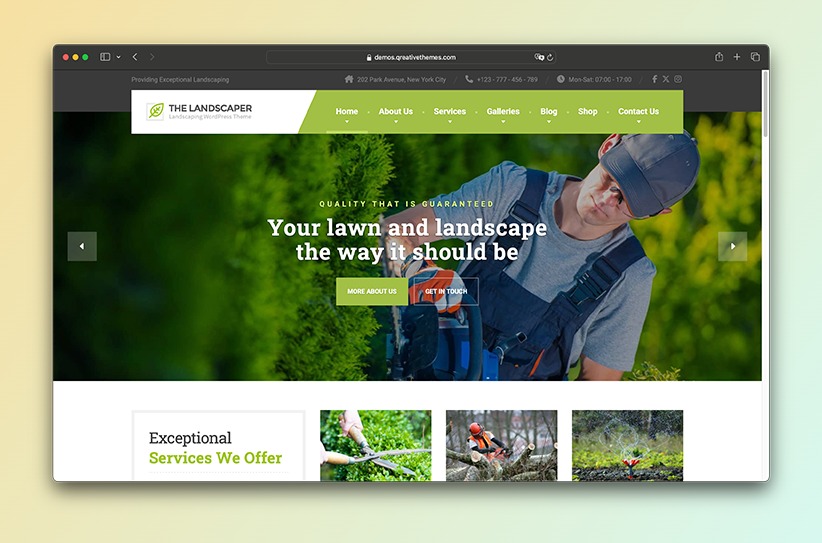
Show your services, project galleries, and estimate form with a WordPress theme built for landscaping companies.