
A great garden sells itself. The problem is, nobody sees it unless they can find you online first.
Most landscaping websites either look like a brochure from 2009 or try to cram everything onto one endless homepage. Neither one wins you new customers.
In this guide I’ll walk you through every page a landscaping business website needs, what to put on each one, and what separates a website that gets enquiries from one that just exists.
1. Homepage: Make It Immediately Clear What You Do and Where
Your homepage has one job: convince a local homeowner or property manager to take the next step. Most people searching for a landscaper are comparing several options at once, your homepage needs to stand out and make it easy to get in touch.
Unlike a lot of industries, landscaping is highly visual. People want to see your work before they pick up the phone. Your homepage should give them a taste of that immediately.
What to include on your homepage:
- A headline that says what you do and where, be specific
- A strong hero image or gallery of your best work
- Your phone number, large and visible without scrolling
- A quote request button or short contact form
- A brief overview of your main services
- Trust signals: years in business, number of projects, service area
- A few short customer reviews
Headline examples (weak vs strong):
❌ Weak: Welcome to Green Gardens — Your Local Landscaping Experts
✅ Strong: Professional Garden Design & Landscaping in New York — Get a Free Quote
❌ Weak: We offer landscaping services for homes and businesses
✅ Strong: Transforming Outdoor Spaces in New York Since 2010
Your hero image is doing heavy lifting on a landscaping website. A stunning before/after photo of a garden you transformed will convert better than any headline you write. Lead with your best work.
2. Services Page: Tell People Exactly What You Do
A landscaping business can mean a dozen different things: garden design, lawn maintenance, tree surgery, paving, irrigation, seasonal planting. A clear services page sets expectations and helps you attract the right type of customer.
It also helps with SEO. A dedicated “Garden Design Houston” page will outrank a generic services list for that specific search almost every time.
Common landscaping services to list:
- Garden design and landscaping
- Lawn care and maintenance
- Tree and hedge trimming
- Paving and hard landscaping
- Planting and seasonal maintenance
- Irrigation systems
- Commercial grounds maintenance
- Garden clearance and cleanup
If you specialise in a few services rather than offering everything, make that clear — it actually builds more trust than trying to be all things to all people.
Give your most profitable or popular service its own dedicated page. A standalone “Garden Design” page with photos, process explanation, and a quote form will convert far better than a bullet point in a list.
3. About Page: Show the Person Behind the Lawn Mower
Landscaping is a trust business. Someone is inviting you onto their property, often when they’re not home. Your about page is where you stop being a random company and become someone they feel comfortable letting into their garden.
This page is especially important for sole traders and small teams, owning the fact that you’re a small, hands-on operation is a strength, not a weakness.
What to include:
- Your story: how and why you started
- Who does the actual work: your team or just you
- Your service area and how long you’ve been operating locally
- Any qualifications, accreditations, or insurance worth mentioning
- Your approach: what makes your work different
Tone examples (weak vs strong):
❌ Weak: We are a professional landscaping company committed to delivering high-quality outdoor solutions.
✅ Strong: I started this business because I genuinely love gardens. Fifteen years later I still get a kick out of handing a client their keys back and watching their face when they see what we’ve done.
Add photos of yourself and your team actually working. Not posed stock shots, but real photos from real jobs. A landscaping business is personal, and people want to know who’s turning up at their home.
4. Project Gallery: Let Your Work Do the Talking
This is the page that sets landscaping websites apart from almost every other industry. Your work is visual, tangible, and often dramatic — a before/after transformation is one of the most convincing things you can show a potential customer.
A gallery page done well can single-handedly convert a hesitant visitor into an enquiry. Done poorly, or skipped entirely, it leaves people with no sense of what you’re actually capable of.
What makes a great landscaping gallery:
- Before and after photos wherever possible, these are gold
- A short caption on each project: location, type of work, scale
- Variety: show different types of projects and garden sizes
- Real photos, not renders: clients want to see actual completed work
- Mobile-optimised: most people will browse on their phone
You don’t need hundreds of photos. Ten stunning projects with before/after shots beat fifty mediocre ones. Quality over quantity every time.
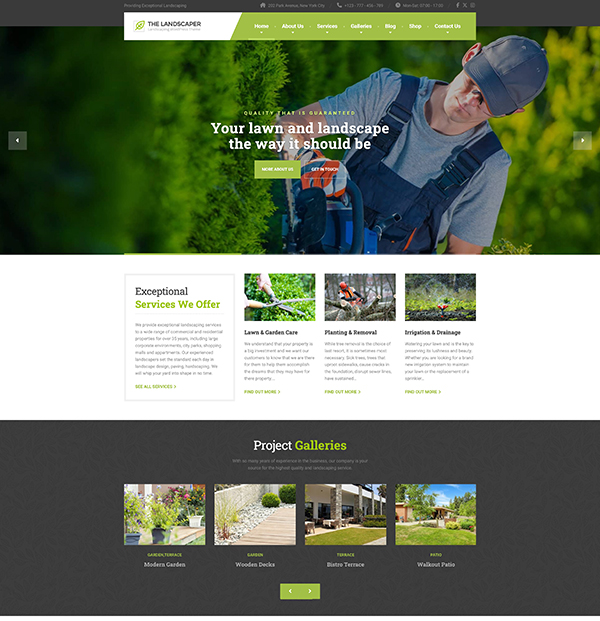
The Landscaper theme includes a built-in project gallery page, so you can start showcasing your before and after work straight away without building anything from scratch.
5. Reviews / Testimonials Page: Word of Mouth, Online
Most landscaping businesses grow through word of mouth. Your website should replicate that. A dedicated reviews page, or a strong testimonials section on your homepage, gives new visitors the social proof they need to pick up the phone.
For a service as personal as landscaping, reviews carry extra weight. People aren’t just buying a product, they’re trusting you with their outdoor space.
What makes a review convincing:
- Specific details: “they redesigned our entire back garden in three days” beats “great service”
- Real names and locations: “Mark from London” feels more credible than anonymous
- A mix of project types: lawn care, design, hard landscaping etc.
- Photos alongside reviews if possible, the ultimate social proof combo
After every completed project, ask for a review while the client is still excited about their new garden. A quick WhatsApp message with a direct Google review link works better than a formal follow-up email a week later.
6. Contact / Quote Page: Remove Every Obstacle
This is the most important page on your website. Everything else leads here.
For a landscaping business, most jobs require a site visit before pricing — so the goal of your contact page isn’t to get a sale, it’s to start a conversation. Make that as easy as possible.
What to include:
- A short enquiry form: name, type of work, location, phone number
- Your phone number, large and tap-to-call on mobile
- Your service area so you don’t get enquiries outside your zone
- Expected response time: “We’ll be in touch within 24 hours”
- An option to attach a photo, especially useful for garden projects
Form length (weak vs strong):
❌ Weak: A lengthy form asking for garden dimensions, soil type, existing plants, budget range, and preferred start date before you’ve spoken to them.
✅ Strong: Name, type of work (dropdown), postcode, phone number. Collect everything else during the site visit.
Add a line near the form that sets expectations: “We offer free no-obligation quotes for all garden projects in [your area].” It removes the last hesitation before someone hits send.
7. Service Area Page: Essential for Local SEO
This is the most underrated page on a landscaping website and one of the highest-impact ones for getting found on Google.
When someone searches “landscaper in Amsterdam” or “garden design Paris,” Google needs to see clear signals that you serve those areas. A well-structured service area page helps you show up in those local searches.
If you serve multiple towns or cities, consider creating a short dedicated page for each one. A “Landscaping in Paris” page targeting that city will consistently outrank a generic service area list.
Even a single well-written service area page is better than nothing. Include the towns you cover, how far you travel, and any local knowledge that shows you’re genuinely rooted in the area, not just a national company passing through.
Optional Pages Worth Adding
Once your core pages are solid, these additions can help convert more visitors and improve your search rankings:
FAQ Page
“Do you offer free quotes?” “How far in advance should I book?” “Do you work in winter?” “Are you insured?” Answer the questions you get asked every week. A good FAQ page saves you time on the phone and reassures customers who are comparing you against competitors.
Blog
Seasonal garden tips, planting guides, how to prepare your garden for winter, the best plants for a small urban garden. A blog builds your authority in local search over time and brings in homeowners who are in the early stages of thinking about their garden, before they’ve picked a landscaper. That’s your chance to be the expert they remember.
Pricing Page
Landscaping pricing varies too much for fixed prices in most cases. But if you offer a standard lawn care package or a fixed-rate garden clearance service, publishing a starting price can filter out price-sensitive enquiries and attract clients who are ready to invest.
A Note on SEO for Landscaping Websites
Getting your pages right is the foundation of a landscaping website that actually gets found locally. A quick checklist:
- Include your town or city name naturally in your page title, first paragraph, and at least one heading
- Write a unique meta description for every page
- Add alt text to every photo, describe the project and include your location
- Get your business listed on Google Business Profile, essential for local search
- Ask every happy client for a Google review, they directly affect your local ranking
- Make sure your phone number is real text, not embedded in an image
The landscaping businesses that rank well locally aren’t doing anything complicated. They just have clear pages that say exactly what they do, where they do it, and show the proof.
Now Go Build It
You don’t need a complicated website. You need a clear one. Get these six pages right and you’ll have a site that actually brings in enquiries. Once that’s working, you can build from there.
Your Landscaping Website, Ready in a Weekend
Every page from this guide, already built.
Just add your content and go live.