
Imagine a small family dental clinic in a mid-sized town. Good reputation, loyal patients, a dentist who’s been practising for fifteen years. But their website? It’s a single page: a phone number, a brief “about us” paragraph, and a photo of the outside of the building taken a long time ago.
New patients looking them up online can’t find their opening hours. There’s no mention of which treatments they offer. No way to book online. No reviews to read.
And so, quietly, those prospective patients move on to the next result.
This is the situation for a surprising number of dental practices. The skills in the chair are excellent. The website doesn’t come close to reflecting that.
The stakes are higher than most dentists realise. Studies consistently show that over 70% of patients research a healthcare provider online before making first contact — and that the majority of those searches happen on mobile, often in the evening, often after a moment of dental discomfort that’s finally become impossible to ignore.
The decision to book is made fast, on an incomplete impression of your practice.
So let’s fix it. Here is every page a dental website needs, what belongs on each one, what mistakes to avoid, and what each page actually does for your practice — both for the patients who land on it and for the search engines that decide whether to show it.

Start With the Foundation: Your Core Five Pages
Before anything else, a functional dental clinic website needs five pages working in harmony. Think of them as the walls of a house — everything else can come later, but without these, you don’t have a structure.
1. Homepage — The 10-Second Test
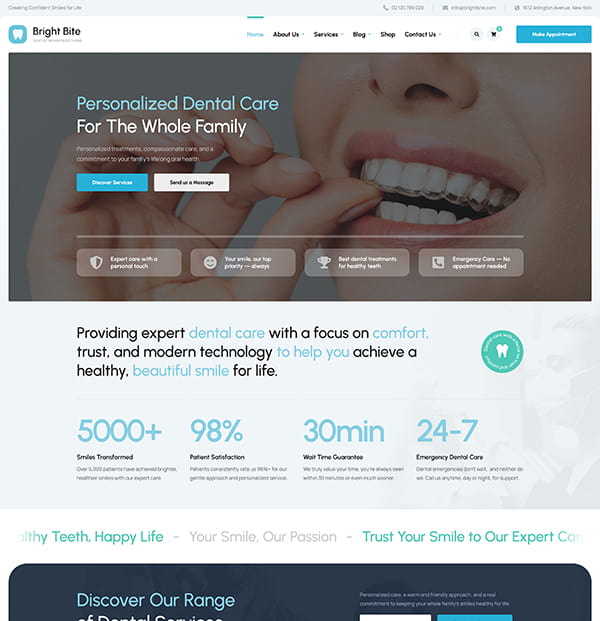
Here’s the honest job description for your homepage: convince a complete stranger, within ten seconds, that they’ve found the right dentist.
Not that you’re a dentist. That you’re the right dentist. There’s a meaningful difference.
Most homepage failures come from one of two things. Either the page is so sparse it doesn’t communicate anything useful, or it’s so overloaded with information that visitors don’t know where to look. Both drive people away.
A homepage that passes the ten-second test includes:
- A headline that names what you do and where — specifically. Not “Welcome to our dental practice” but “Family Dentist in [Your City] — Taking New Patients“
- A large, clearly visible phone number and a booking button — before the scroll
- A sentence or two about what makes your practice the right choice (not generic, specific)
- Real photos of your waiting room, your team, your actual space
- Two or three patient reviews, pulled high up the page
- A brief overview of your main service areas with links to deeper pages
The homepage doesn’t need to explain everything. It needs to give people enough confidence to keep reading, and make it easy to book the moment they decide to.
SEO note: Your homepage title tag and first paragraph should naturally include your primary keyword and location. Something like“dental clinic website” or “family dentist [city]” — written for humans, not search engines.
Common homepage mistakes:
- Generic stock photography of smiling people who look nothing like a real dental team, patients notice immediately and it erodes trust
- A booking form that’s buried below the fold or hidden in the navigation
- No mention of whether you’re taking new patients (a surprising number of sites omit this entirely)
- Autoplay videos or slow-loading hero images, page speed directly affects both rankings and conversions, and healthcare sites are no exception
2. Services Pages — Where Your Homepage Points People
One of the most common structural mistakes on dental websites is treating “services” as a single page with a bulleted list. That approach is both a missed SEO opportunity and a poor patient experience.
Here’s why it matters: someone searching for “dental implants in Seattle” isn’t just looking for a dentist. They’re looking for a dentist who specialises in implants, who explains the process, who gives them enough information to feel confident booking a consultation.
A single bullet point on a general services list doesn’t do that. A dedicated page does.
Which services deserve their own page?
As a general rule: any treatment that patients specifically search for, or that is a significant revenue driver for your practice, warrants its own page. That typically includes:
- Teeth whitening
- Dental implants
- Invisalign or clear aligners
- Veneers or composite bonding
- Children’s dentistry
- Emergency dental appointments
- Routine check-ups and hygiene appointments
Each service page should explain what the treatment is, who it’s suitable for, what to expect at each stage, how long it takes, and how to book a consultation.
URL structure matters more than most dentists realise
Use a nested structure like /services/dental-implants/ rather than flat URLs like /dental-implants/. The nested structure signals to Google how your content is organised and makes it easier to build topical authority across your full service range.
Your main /services/ page should act as a hub that links out to each individual treatment page. That internal architecture helps both patients navigate and search engines understand your site.
How long should a service page be?
Long enough to genuinely answer every question a patient might have.
For a high-value treatment like dental implants, that means covering: what the procedure involves, who is a suitable candidate, how many appointments are needed, expected recovery, longevity and maintenance, and an honest note on cost range.
Pages that thin out at 200 words rarely rank for competitive terms. They don’t demonstrate that your practice understands the topic in depth, and Google notices.
Common service page mistakes:
- Using clinical language patients don’t understand (“osseointegration” needs to be explained, not assumed)
- Not addressing cost at all — patients searching for implants or Invisalign want a ballpark, and refusing to provide one creates friction
- Near-identical content across related service pages (e.g., veneers and bonding) — Google treats this as thin or duplicate content
- No internal links between related service pages (whitening links naturally to veneers; implants links naturally to bone grafting if you offer it)
SEO note: A dedicated “dental implants [your city]” page, written with genuine depth, will consistently outrank a generic services list for that search term. Each service page is an independent ranking opportunity. Build them as if each one might be the first, and only, page a patient reads before deciding to call.
3. About Page — The Trust Page
Dentistry is one of the most trust-dependent services there is. People recline in a chair, open their mouths, and allow someone they may never have met before to work on them with instruments.
The decision to make that first appointment often hinges entirely on whether they feel they know and trust the person they’ll be seeing.
Your About page is where that trust gets built, or doesn’t.
The practices that do this well write in plain, human language rather than corporate-speak. They include genuine photos of the dentist and team, not posed headshots. They tell a story, how the practice started, what the dentist cares about, what kind of experience patients can expect.
Compare these two approaches to the same idea:
Weak: “Dr. Chen provides high-quality dental care with a commitment to patient comfort and clinical excellence.”
versus:
Strong: “I became a dentist because my own childhood dentist made what could have been a scary experience feel completely normal. That’s the kind of practice I’ve tried to build in Portland, one where nervous patients feel at ease and nobody leaves feeling like they didn’t understand what just happened.”
The second version says something specific. It tells you who this person is and what to expect. That’s what a good About page does.
Include candid photos of your team at work, real shots from your actual clinic, not a photoshoot that looks like a stock library. List qualifications, association memberships, CPD focus areas, and specialist training.
If you have associate dentists or hygienists, give them a proper profile: a photo, a few sentences about their background, and what they particularly enjoy treating. Nervous patients often look up who they’ll be seeing before they arrive.
Why this matters for Google too:
The About page is where your E-E-A-T signals live, Google’s shorthand for Experience, Expertise, Authoritativeness, and Trustworthiness. For healthcare-adjacent sites, these signals carry real weight in how Google assesses your content.
GDC registration numbers, named qualifications, association memberships, and years of practice aren’t just reassuring to patients, they’re the kind of verifiable detail that strengthens your site’s credibility in Google’s eyes.
Common About page mistakes:
- Stock photos of generic dentists instead of your actual team
- Listing qualifications without explaining what they mean (“MJDF RCS” means nothing to a patient; explain it in one line)
- Writing entirely in the third person (“Dr. Smith graduated from…”), it creates distance rather than trust
- Not mentioning how long the practice has been open, which signals stability and experience
4. Contact & Appointments Page — Remove Every Reason Not to Book
This page has one job: turn an interested visitor into a booked patient. Every element of it should serve that goal.
What that means in practice:
- Phone number in large, readable text — and tap-to-call on mobile (if your number isn’t tap-to-call, you’re losing bookings every day)
- An enquiry form that asks only what you need: name, contact number, preferred time, and a brief note about their situation
- Your address, with an embedded Google Map
- Your opening hours — including whether you take emergency same-day calls and whether you have early or late slots
- A note about the new patient process: “We’ll call you back within a few hours to confirm your appointment”
- Parking information — this gets asked on the phone constantly; answer it here
Add a short line near the form that removes hesitation: “We’re currently welcoming new patients and can usually offer an appointment within [X] days.”
It answers an unspoken question, particularly for people who’ve let their dental care lapse and feel awkward about it, and makes the decision to submit the form much easier.
Common contact page mistakes:
- Forms that ask for insurance details, dental history, or preferred treatment type before first contact, collect that after they’ve booked, not before
- No indication of how quickly someone will hear back, uncertainty kills conversions
- Missing emergency availability, if you offer same-day emergency appointments, state it explicitly; patients searching in pain at 7pm need to see it immediately
- No mention of whether you accept NHS patients, private patients, or both
5. Testimonials — Your Patients’ Words Do More Work Than Yours
Every dentist says they’re caring, professional, and patient-focused. What makes a potential patient believe it isn’t you saying it — it’s your existing patients saying it on your behalf.
A testimonials page (or a well-placed testimonials section on your homepage) is one of the highest-value pieces of social proof a dental website can have. But there’s a significant difference between testimonials that convert and testimonials that are just… there.
What makes a testimonial credible and persuasive:
- Specificity — “I’d been avoiding the dentist for eight years because of anxiety. The team here were so patient that I actually relaxed during my appointment” is far more useful than “Very professional, would recommend.”
- Real names and, where patients consent, photos
- A range of scenarios — nervous patients, cosmetic treatment, children, emergency appointments
- Embedded Google reviews where possible, a live feed from an external platform carries more credibility than a curated selection of screenshots
How to get better testimonials:
Ask directly, in person, while the patient is still pleased with the result. A verbal ask in the room consistently outperforms a formal email a week later.
When following up digitally, send a direct link to your Google review page, not a link that requires three clicks to find the right form.
SEO note: Your Google Business Profile reviews directly influence your local search ranking. Volume, recency, and specificity all send signals to Google that your practice is active and well-regarded. This is one of the few ranking factors you can improve through patient relationships rather than technical SEO work.
6. Blog — The Page Most Dental Websites Skip (and Shouldn’t)
A blog isn’t going to fill your appointment book in the first month. But a consistent, genuinely useful blog, maintained over six to twelve months, can expand your search visibility in ways that static service pages alone cannot.
Your service pages target commercial terms: “dental implants Manchester“, “Invisalign Leeds“. These are competitive, valuable, and worth fighting for.
But patients also search informational terms at every stage of their decision journey: “how long does Invisalign take“, “is teeth whitening safe during pregnancy“, “what to eat after a tooth extraction“. These searches have high volume, lower competition, and the people making them will, some portion of the time, become patients.
A blog lets you capture that traffic. More importantly, it lets you demonstrate expertise in a way that a service page alone cannot.
What blog content actually ranks for dental practices:
- FAQ-format posts targeting specific questions (“How long does teeth whitening last?“) — these match the exact phrasing of voice searches and Google’s “People Also Ask” boxes
- Comparison posts (“Dental implants vs bridges: which is right for me?“) — attract high-intent readers actively weighing their options
- Local posts (“What to do in a dental emergency in [Your City]“) — build local relevance and often rank in map pack results
- Step-by-step treatment explainers, reduce pre-appointment anxiety and are frequently shared by existing patients
What tends not to work:
Generic posts on topics already covered comprehensively by major dental associations or NHS resources.
“What is tooth decay?” is not a post you’re going to rank for. “What happens at a scale and polish if you haven’t been to the dentist in five years?” is specific enough to attract a real audience and low-competition enough to rank.
How to structure posts for SEO:
Use an H1 title that contains your target phrase. Use H2 subheadings to break the post into logical sections. Add a FAQ section at the bottom where it fits naturally, Google frequently pulls these into featured snippets, which appear above organic results and drive traffic without a click.
How often to publish:
Two posts a month is enough to build meaningful visibility over twelve months, but only if the posts are genuinely detailed and useful. Four thin posts a month is worse for SEO than two thorough ones. Quality signals (time on page, low bounce rate, return visits) matter more than volume.
Internal linking:
Every blog post should link to the relevant service page. A post about Invisalign links to your Invisalign page. A post about dental anxiety links to your About page and your new patient page. This passes authority from your blog content to your commercial pages, and it’s one of the most underused SEO tactics on dental websites.
Common blog mistakes:
- Publishing posts and never updating them, a 2021 post about NHS charges that no longer reflects current prices actively undermines trust
- Writing for Google rather than for patients, keyword-stuffed posts with no real substance rank poorly and read poorly
- No call to action at the end of posts, every post should close with a relevant next step: book a consultation, read more about the treatment, or call if you have questions
Optional Pages That Punch Above Their Weight
Once your core pages are live and working, these additions are worth considering. Each one addresses a specific patient need or search behaviour that your core pages can’t fully cover.
FAQ Page
“Do you offer payment plans?” “Are you taking new NHS patients?” “What happens if I need an emergency appointment?“
These are questions your receptionist answers on the phone every single day. Put the answers on your website and you’ll reduce call volume, improve patient experience, and give Google another page of well-structured content to index.
A well-built FAQ page also gives you a strong chance of appearing in Google’s featured snippet boxes, the answers that appear at the top of search results before any links. Structure each question as an H2 or H3 heading, followed by a direct answer of two to four sentences.
Before & After Gallery
For practices that offer cosmetic treatments, this is one of the most persuasive pages you can build. Real results from consenting patients, particularly composite bonding, whitening, implants, and orthodontic cases, show prospective patients what’s possible in a way that words simply cannot.
A few practical notes: always get written consent specifying how images will be used. Don’t pair before photos taken under harsh overhead lighting with after photos taken in flattering natural light, patients notice the inconsistency and it erodes trust. Group cases by treatment type so visitors can find relevant examples quickly.
New Patient Information Page
What should someone bring to their first appointment? What’s the new patient process? Is there parking? Do you see NHS and private patients? How long does a first appointment take?
A dedicated new patient page reduces friction, sets expectations, and makes people feel looked after before they’ve even arrived.
It also captures a specific search pattern: people who’ve already chosen a dentist and are now preparing to book. They’re not comparing practices anymore, they’re looking for reassurance. This page is what converts them from considering to confirmed.
Service Area Pages
If your practice draws patients from several nearby towns or suburbs, a short page for each area like “Dentist in [Nearby Town]“, can meaningfully improve your local visibility beyond your immediate postcode.
Even four or five hundred words, written specifically for that location, is enough to start appearing in local results for that area.
These pages work best when they’re genuinely specific, not templated copies with the town name swapped out. Mention the local area by name, note your travel time from it, and give someone from that location a concrete reason to choose your practice.
Every Page Has a Job. Make Sure It’s Doing It.
The most effective dental websites aren’t the most elaborate. They’re the most purposeful.
Every page exists to do something specific, build trust, answer a question, explain a treatment, prompt an appointment. When you look at each page of your site with that lens, the gaps become obvious. And so do the fixes.
A homepage with no booking button. A services page with no explanation of what to expect. An About page written in corporate-speak by someone who’s never met the dentist. These aren’t design problems, they’re content problems. And content problems are fixable.
The structure described in this guide isn’t a wishlist. It’s the minimum architecture that allows a dental practice to compete online in 2025 and beyond. Every page has a job. Make sure it’s doing it.
Your Dental Clinic Website, Ready in a Weekend
Every page from this guide, already built. Just add your content and go live.