
Most physiotherapy practice owners think about marketing from their own perspective: What can I do to get more patients?
But the more useful question is: What does a patient actually do when they need a physiotherapist? Understanding that journey changes everything about how you approach your online presence.
So let’s walk through what usually happens. A patient feels pain, searches on Google, compares a few practices, and eventually books an appointment. At each step there’s a chance to either win or lose that patient, and most practices lose them in the same two or three places without even realizing it.

Step 1: The Search, What Patients Actually Type Into Google
Understanding what your potential patients search for is the foundation of being found online. Most practice owners assume people search for “physiotherapist” followed by their city. Some do, but many search for something more specific.
Common search patterns:
- Symptom-based: back pain treatment New York, knee pain physio London, shoulder injury rehab
- Condition-based: ACL rehabilitation, frozen shoulder physiotherapy, physio for sciatica
- Proximity-based: physiotherapist near me, physio open Saturday, same week physio appointment
- Referral-based: physiotherapist recommended by GP, sports physio for runners
This matters because it tells you exactly what your website and Google Business Profile need to say. If someone searches “knee pain physio Amsterdam” and your website only mentions “physiotherapy services” without specifying the conditions you treat or the city you’re in, you’re invisible to that search.
What this means for your website:
Every condition you treat should be mentioned explicitly, ideally on its own dedicated page. “We treat back pain, sports injuries, post-operative rehabilitation, and more” is far less effective than a dedicated page for each condition that explains what it is, how you treat it, and what results patients can expect.
Your location needs to be mentioned naturally throughout your site, not just in the footer. Page titles, headings, and the first paragraph of key pages should include your city naturally.
Use Google Search Console to see exactly what people are typing before they land on your website. You’ll often find condition-specific searches you hadn’t thought to target, and it shows you which pages are already doing well so you can build on them.
Step 2: The Scan, How Patients Evaluate Search Results
When a patient searches for a physiotherapist, they don’t read every result carefully, they scan. In about ten seconds they decide which one or two results are worth clicking. Understanding what they’re looking at in those ten seconds tells you exactly what to prioritise.
What patients look at in search results:
- Star rating and review count, visible directly in Google results and on the map
- The title and description : does it mention their specific condition or location?
- Whether you appear on the map : map listings get a disproportionate share of clicks
- How recently you’ve been reviewed : old reviews signal an inactive practice
The Google map pack:
The three businesses shown on the map above the regular search results, called the map pack, receive a significant majority of all clicks for local searches. If you’re not in it, you’re largely invisible for local searches regardless of how good your website is.
Getting into the map pack comes down to three things, a fully completed Google Business Profile, a consistent stream of recent reviews, and clear signals on your website that you’re based in the area you’re targeting.
Search for physiotherapists in your city as if you were a new patient. This shows your Google Business Profile from a patient’s perspective and helps you quickly spot things to improve.
Step 3: The Website Visit, Five Seconds to Make an Impression
A patient clicks through to your website having already formed a partial impression from your search listing. Now they’re deciding whether to stay or go back and try someone else. Most physiotherapy websites lose patients at this point, not because the practice is bad, but because the website fails to answer the questions the patient is silently asking.
What a patient is asking in the first five seconds:
- Is this a real, established practice or a one-person operation working from a spare room?
- Do they treat what I’m coming in for?
- How soon can I get an appointment?
- Who will I actually be seeing?
- Does this feel like somewhere I’d be comfortable?
What answers those questions:
- A professional, clean website that loads quickly and works well on mobile
- A clear headline that mentions your main treatment areas and location
- Photos of your clinic and team, real photos, not stock images
- A visible booking button or phone number above the fold
- A treatment list that mentions their specific condition
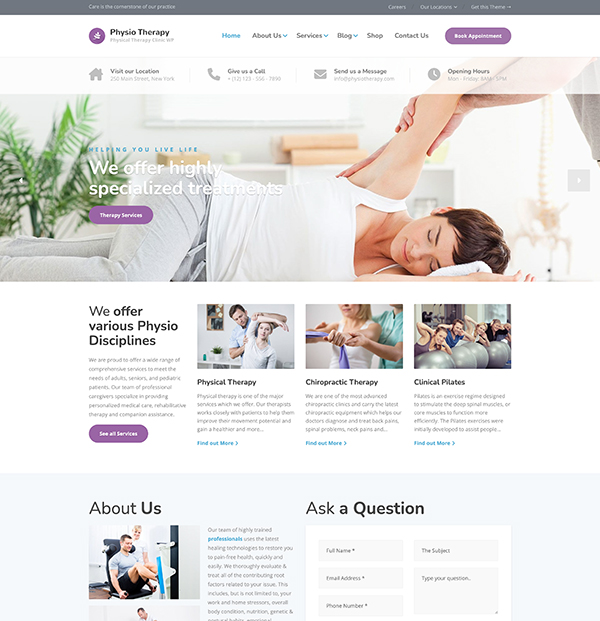
The structure of your website matters as much as the content. The Physio WordPress theme is built around exactly these patient questions with the team, treatments, and booking options positioned where new patients are looking for them, so you’re not losing patients to a website that just doesn’t answer the right questions fast enough.
Open your website on your phone as if you were a new patient. Can you quickly find the phone number, see what you treat, and book or enquire within 30 seconds? If not, you’re likely losing potential patients.
Step 4: The Review Check, The Moment That Often Decides It
Most patients who are seriously considering booking with you will check your Google reviews before they do. This is especially true for physiotherapy, it’s a healthcare decision, and people are cautious about who they trust with their physical wellbeing.
What patients look for in reviews:
- Overall star rating : 4.5 or above is the general threshold of trust
- Review count: ten reviews feels thin, fifty feels established
- Specific outcomes: “my back pain was gone after four sessions” is far more convincing than “great service”
- Mentions of their specific condition: confirmation that you’ve helped people with the same problem
- How you respond to reviews. It shows you’re attentive and professional
The review gap most practices don’t notice:
Many practices have good reviews but not enough of them, or plenty of reviews that are simply old. When a profile shows 40 reviews but the most recent is from 18 months ago, it quietly raises a question: are they still as good? Are they still busy? A steady trickle of recent reviews answers that question before it’s even asked.
Ask for a review after every successful treatment, not just when you remember. A simple text with a direct link sent the day after discharge is the most reliable way to grow your reviews.
Step 5: The Booking Decision, Remove Every Barrier
By the time someone has found you, visited your website, and read your reviews, they’re usually ready to book. The only thing left is to make sure nothing gets in their way.
Common barriers that lose patients at the final step:
- No online booking: a meaningful proportion of patients, especially younger ones, won’t call
- Phone goes to voicemail with no indication of when it will be returned
- Contact form with no expected response time: uncertainty kills momentum
- No indication of current availability: patients don’t know if they’ll wait two days or two weeks
- Website not working properly on mobile. Most patients are booking from their phone
What a frictionless booking experience looks like:
❌ Weak: A contact form with eight fields, a phone number that goes to a generic voicemail, and no indication of when appointments are available.
✅ Strong: An online booking calendar showing real availability, a phone number answered during clinic hours, and an auto-response confirming receipt of enquiries with an expected callback time.
Every extra step or uncertainty between a patient deciding to book and actually booking is a point at which they might reconsider, get distracted, or find a competitor who makes it easier. The practices that convert the most website visitors into booked appointments are the ones that make the final step feel effortless.
If you don’t offer online booking yet, add a simple note on your contact page like “appointments available within three working days.” It costs nothing and reduces the uncertainty that makes patients hesitate.
The Full Picture
The patient journey from Google search to booked appointment has five distinct steps, and most practices are losing patients at one or two of them without realising it. Search visibility, a trustworthy website, strong reviews, and a frictionless booking process aren’t separate marketing tactics. They’re a chain. Strengthen the weakest link and you’ll see more patients without spending anything on advertising.
Now Look at Your Practice Through a Patient’s Eyes
Go through each step in this guide as if you were a new patient searching for a physiotherapist in your city. You’ll find the gaps faster than any audit tool, and fixing them is usually simpler than you’d expect.
Your Physical Therapy
Website, Ready in a Weekend
Built specifically for physiotherapy practices. Professional, fast, and ready to start attracting new patients.